SignUpGenius Alternative: SignUpSnap vs SignUpGenius

If you want a SignUpGenius alternative for parent-teacher conferences, SignUpSnap is the better fit for one teacher running conferences, sign ups and RSVPs without ads. SignUpGenius is the better fit for large groups, whole-school setups and anything that collects money.
Both tools are free to start, and parents book from a link without an account. The differences are in the conference tools, what sits behind a paid plan, and who each tool was built for.
SignUpSnap vs SignUpGenius at a Glance
Feature | SignUpSnap | SignUpGenius |
|---|---|---|
Price | Free plan, plus Teacher Pro (see Pricing) | Free plan. Paid plans start with Silver at $8.99 a month billed annually, or $11.99 billed monthly |
Ads | None on any plan | Ad-free sign ups are a paid plan feature: 1 on Silver, 10 on Gold, unlimited on Platinum |
Parent Accounts | Not needed | Not needed |
Conference Scheduling | Built in: dates, start and end times, slot length and break for each date | Time slots of 15, 20 or 30 minutes with buffer time, and multiple teachers under one shared link |
Reminders | Every plan, 1 day before. Teacher Pro picks the timing and adds a second reminder | Automatic reminders on the free plan. Custom reminders and confirmations on paid plans |
Video Links | Google Meet, Zoom or Teams link on each video booking, on every plan | Not listed on its site |
Waitlist | Teacher Pro | Gold and higher plans |
Checked Nov 8, 2026
SignUpGenius prices and plan features come from its pricing page and its conference page.
A SignUpGenius Alternative Built for Conferences
SignUpGenius is a general sign up tool, and it does conferences well: set up time slots, share one link and let parents pick a time. You create a sign up and add slots to it.
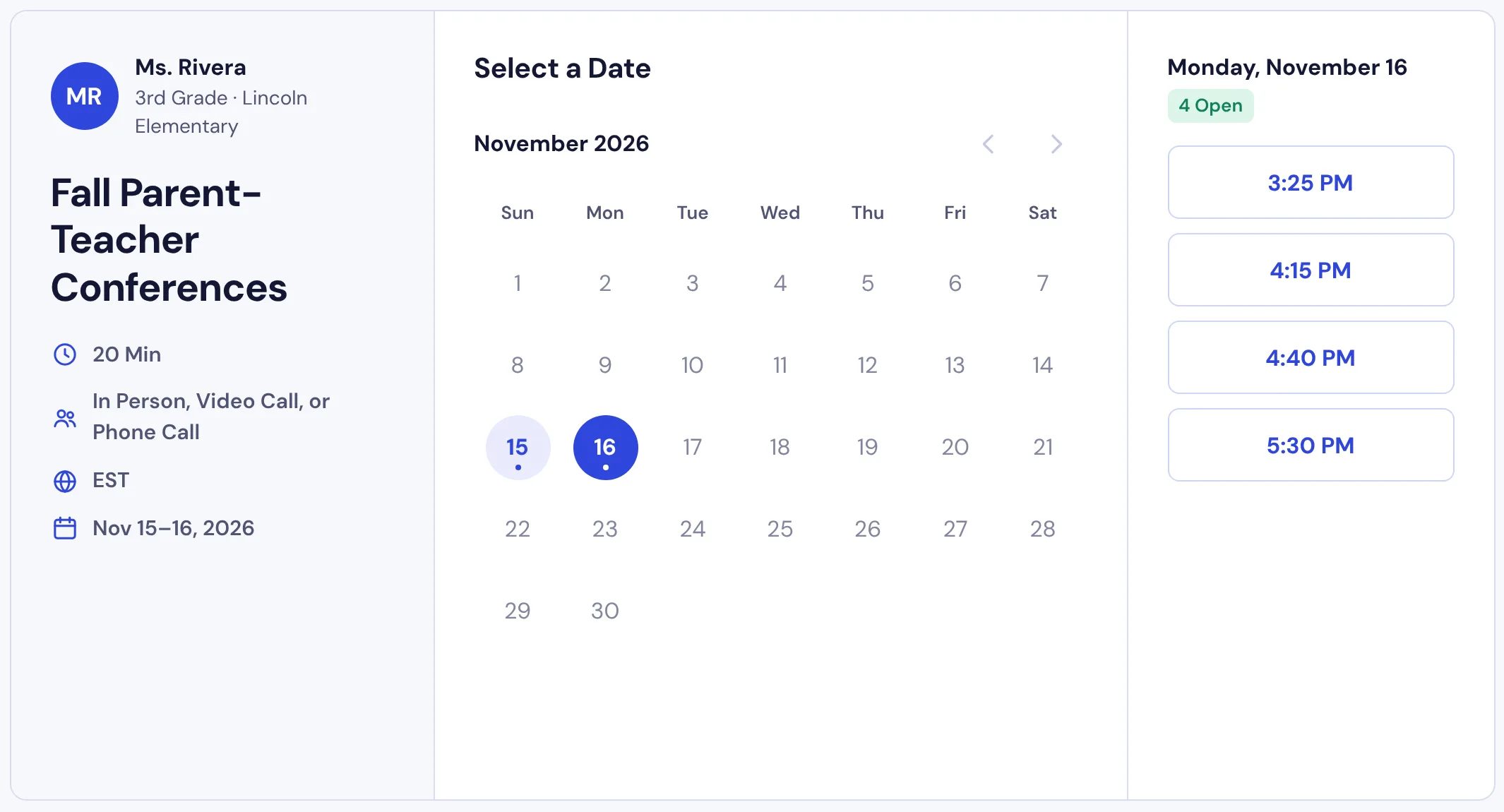
SignUpSnap starts from the conference itself. You pick the conference dates, then set the start and end time, slot length and break for each date. One date can run 20-minute slots with a 5-minute break while the next runs 15-minute slots with no break. The Parent-Teacher Conferences page shows the full flow.
Parents open the link, pick a date and one of the open times, then fill in their details to book. They don't make an account or download an app.
If this is your first conference form, How to Schedule Parent-Teacher Conferences Without the Email Chaos walks through the planning.
Ads and What You Pay
On SignUpGenius, removing ads is something you pay for. Silver takes ads off 1 sign up at a time, Gold covers 10, and Platinum covers all of them. That adds up for a teacher who runs several sign ups a year, such as conferences, a class party, a supply list and field trip chaperones.
SignUpSnap has no ads on any plan, for teachers or for parents. The Free plan has a different limit: one form Active at a time. Drafts don't count, so you can build the next form while the current one runs. Teacher Pro lifts the limit. Prices are on the Pricing page.
Reminders on Free and Paid Plans
SignUpSnap Free sends one reminder email 1 day before each booking. SignUpGenius lists automatic confirmation and reminder emails on its free plan, with custom reminders and confirmations on paid plans.
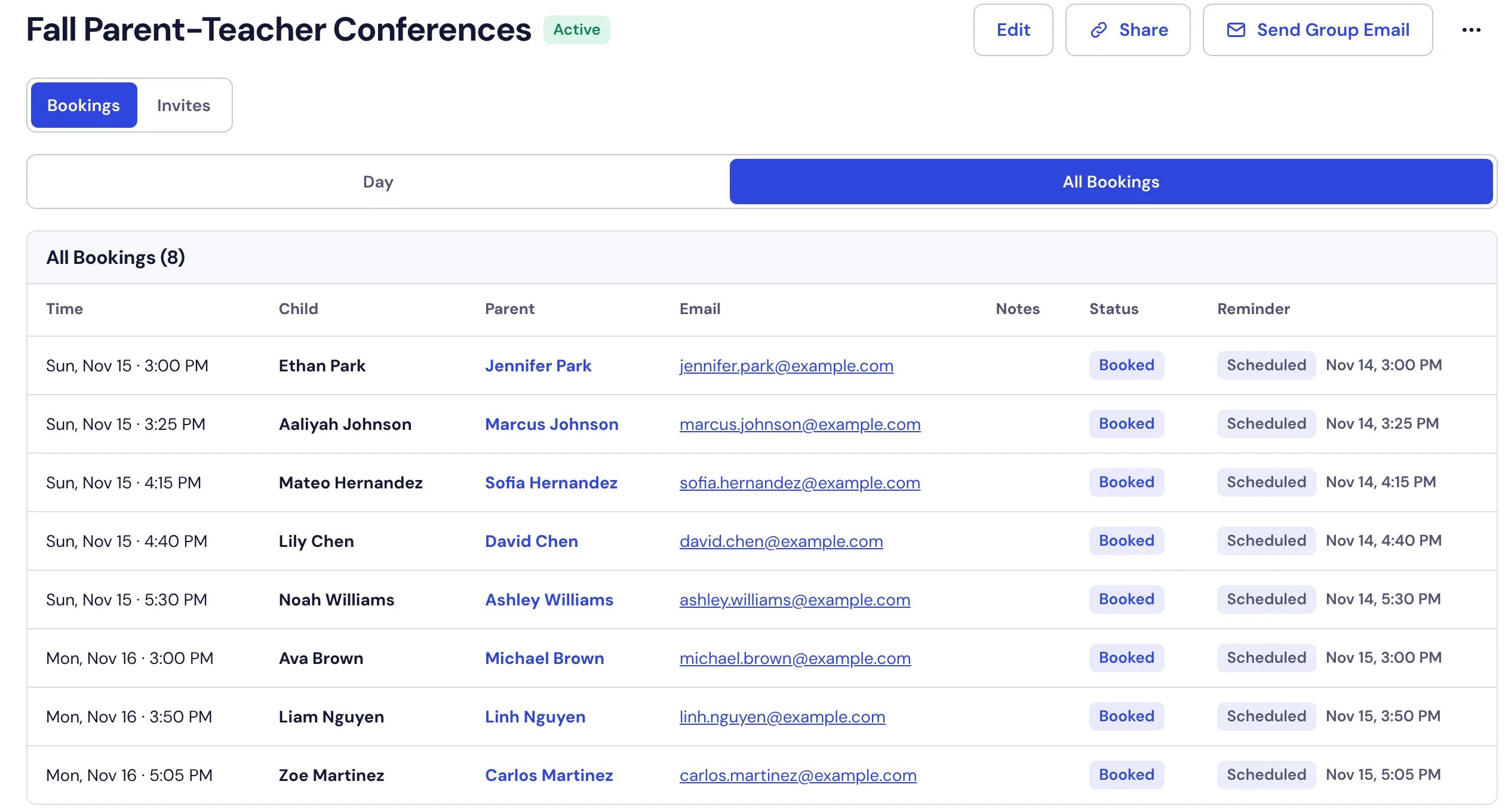
On SignUpSnap Teacher Pro, you pick when the reminder goes out (1 Week Prior, 2 Days Prior, 1 Day Prior or 2 Hours Prior) and can add a Second Reminder. You can also use Send Reminder Now to email one family right away.
On every plan, the Reminder column on a form shows each booking's latest reminder as Scheduled, Sent or Bounced. Bounced means the email didn't reach the family, so check the address with them.
The Help Center article on Reminders covers timing and late sign ups.
Video, Phone and In Person
In SignUpSnap, set Meeting Type to Parent Chooses and each family picks in person, video or phone. When a family books a video time, SignUpSnap creates a Google Meet, Zoom or Teams link for that booking. If the time changes, the meeting moves with it, and if the booking is canceled, the meeting is removed.
You connect Google, Outlook or Zoom once in Settings, and this works on the Free plan too. Let Parents Choose In Person, Video or Phone covers the setup.
SignUpGenius doesn't list video links for conferences on its site. If many of your conferences happen on video, find out how the meeting link would reach each family before you choose a tool.
Waitlists
A waitlist fills a spot when a family cancels. SignUpGenius lists waitlists on its Gold and higher plans. SignUpSnap includes them in Teacher Pro.
In SignUpSnap, the first waiting family is offered the open spot and has 12 hours to accept before it goes to the next family. How Waitlist Offers Work explains the details.
Inviting Families
You can email families a link to the sign up from either tool. In SignUpSnap, you paste or upload parent emails into a list, invite the list from the form editor, and then see on the Invites tab who opened the link and who booked. To nudge the rest, use Send Group Email and pick Not Booked. Lists work on the Free plan, with up to 50 contacts in a list and 100 emails a day.
SignUpGenius lists email invites and group messages on every plan, 1,000 a month on the free plan, and its paid plans add text invites and updates. If you want to text families, SignUpGenius has the edge.
Parents and Languages
SignUpGenius says parents don't need an account to sign up. SignUpSnap works the same way for parents: no account and no app, on a phone or a computer.
Parents can change their own time in either tool. In SignUpSnap, the confirmation email for a conference has Change Time and Cancel Booking buttons, so a family can move to another open time or cancel until that time starts.
On Teacher Pro, the booking page and the parent emails also come in Spanish and French. Each family picks a language at the top of the page and gets the emails in that language.
What the Free Plans Give You
SignUpGenius lists unlimited sign up pages, automatic confirmation and reminder emails, recurring event duplication and QR codes on its free plan, and keeps ad-free pages for paid plans. SignUpSnap Free gives you conferences, sign ups and RSVPs, confirmation and reminder emails, calendar and video connections and Export CSV, with one form Active at a time.
For one classroom, one Active form often covers conference season. A form that ended stops counting toward the limit, so the next one can go Active. To run two at the same time, Archive one or move to Teacher Pro.
When SignUpGenius Fits Better
Going by its own site, SignUpGenius is the stronger pick in these cases:
Payments and fundraisers: SignUpGenius lists payments, fundraisers, dues and fees, tickets and online stores. SignUpSnap does not take payments.
Many sign ups at once for free: the SignUpGenius free plan lists unlimited sign up pages, while SignUpSnap Free keeps one form Active at a time.
Whole-school conferences: SignUpGenius can group multiple teachers under one shared link, so a family with more than one child finds every conference in one place. Paid plans add administrators, up to 20 on Platinum.
Text messages: paid plans include text invites and updates each month.
Custom questions and larger setups: paid plans list custom questions and API access, Platinum adds custom portal pages, and Enterprise adds single sign-on.