Parent-Teacher Conference Sign Up Sheet: Paper vs Online

The best parent teacher conference sign up sheet is the one every family can find, fill out and change without calling you. Paper does that for some classes. An online sheet does it for most.
Neither choice is wrong. The right one depends on your families, your school and how many conferences you run.
Paper Parent Teacher Conference Sign Up Sheet: When It Works
Paper is simple. You print a page, tape it to the classroom door or hand it out at back-to-school night, and families write their name next to a time. There is nothing to log in to and nothing to learn.
It works best when:
You have a small class and a short list of times.
Most parents come into the building anyway, for drop-off, pickup or an open house.
You can wait a few days to see what came back.
Some families have limited email or phone access.
It also gives you a printed schedule to hold on conference day.
How to Make a Paper Sign Up Sheet That Works
A good sheet answers every question before a parent has to ask it. Keep it to one page, in large type, with a title at the top that says what it is: "Fall Parent-Teacher Conferences, Room 12."
Columns to Include
Date and time, pre-printed, one row for each slot.
Child name. First name and last initial is usually enough.
Parent name, so you know who to expect.
Phone or email, so you can send a reminder.
Families will see every name written on a sheet taped to a door. Ask only for what you need, and consider a separate slip for contact details.
A Sample Time Slot Layout
Print a row for each time. This one uses 20-minute slots with a 5-minute break between them:
Time | Child | Parent | Phone or Email |
|---|---|---|---|
Mon, Nov 16, 3:00 PM | |||
Mon, Nov 16, 3:25 PM | |||
Mon, Nov 16, 3:50 PM | |||
Mon, Nov 16, 4:15 PM |
Tips for a Better Paper Sheet
Leave a break between meetings. Five minutes lets you write notes and greet the next family without rushing.
Offer a few evening slots. Many parents cannot leave work at 2:00 PM.
Add a line at the bottom: "Can't make any of these times? Write your name and I'll call you." It reaches families who would not speak up on their own.
Pick a due date for the sheet and put it at the top.
Send a copy home in each backpack, and take a photo of the finished sheet for yourself.
Where Paper Breaks Down
Paper gets harder as the class grows. Watch for these problems:
Two copies, one on the door and one sent home, can give the same time to two families.
A sheet that never comes back from a backpack looks the same as a family who is not coming.
Families who do not come into the building can only sign up if you chase them.
When a family needs a different time, you cross out a row, find another and tell them yourself.
You have to call or text each family the day before to remind them.
A sheet in English can leave out families who read another language.
None of these are a big deal for a class of 12. They add up for a class of 28, or if you teach several sections.
Parent Teacher Meeting Sign Up Sheet vs Online Sign Up
An online sheet fixes most of those problems and adds one of its own. A family with no email address needs your help to book.
Question | Paper | Online |
|---|---|---|
Double booking | Possible with more than one copy | A booked time disappears for everyone else |
Reaching families | Backpack, door or event | One link by email, text or newsletter |
Changing a time | You cross out and rewrite | Families change it themselves |
Reminders | You call or text | Sent by email |
Families without email | Works | Needs help from you |
Setup | A printer and tape | A few minutes on a computer |
School Conference Sign Up Online: What to Look For
Whatever tool you choose for a school conference sign up online, check it against this list before you share the link.
Parents book from a link, with no account. A password step loses families.
A booked time disappears for everyone else. This is what ends double booking.
The page works on a phone. Most parents will open the link in a hallway or at work.
Families get a confirmation email with their time and a reminder before it.
Parents can change or cancel on their own, and the time opens up for another family.
The page has no ads between a parent and the list of times.
The form asks for the least you need, such as a first name and last initial instead of a full child name.
For a side-by-side look at one well-known option, see how SignUpGenius compares.
How a Parent Teacher Conference Time Slot Sign Up Works Online
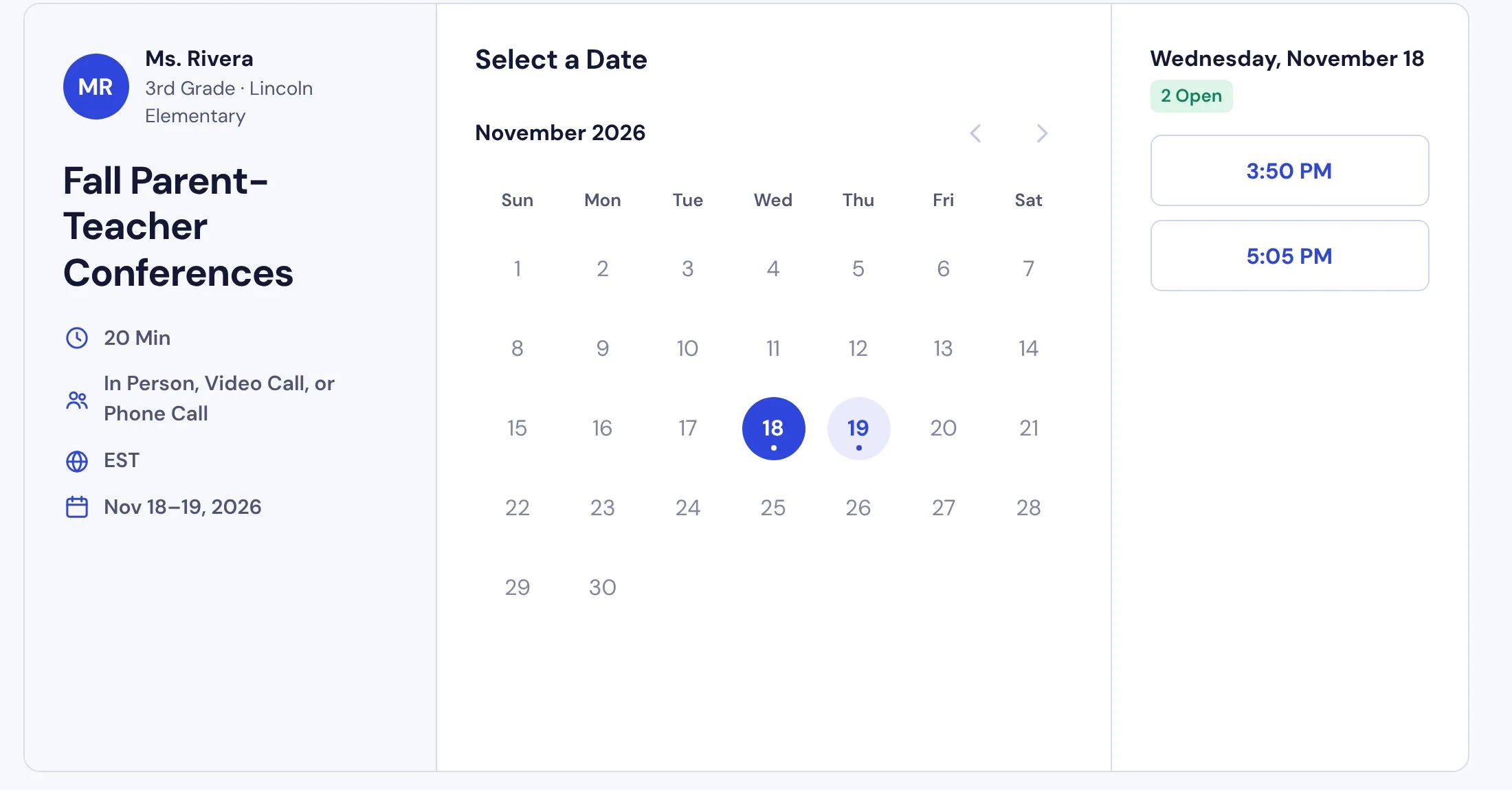
In SignUpSnap, you pick your conference dates, then set a Start Time, End Time, Slot Length and Break for each date. The app cuts those hours into meeting times for you, so one date can run 20-minute slots while another runs 15.
Parents open your link, pick a day and a time, and enter their name, email and child's name. They do not need an account. The time they pick is gone for everyone else.
Each family gets a confirmation email with Change Time and Cancel Booking buttons. On the Free plan, each booking also gets a reminder email 1 day before. Teacher Pro lets you choose the timing and add a second reminder. See Pricing for plans.
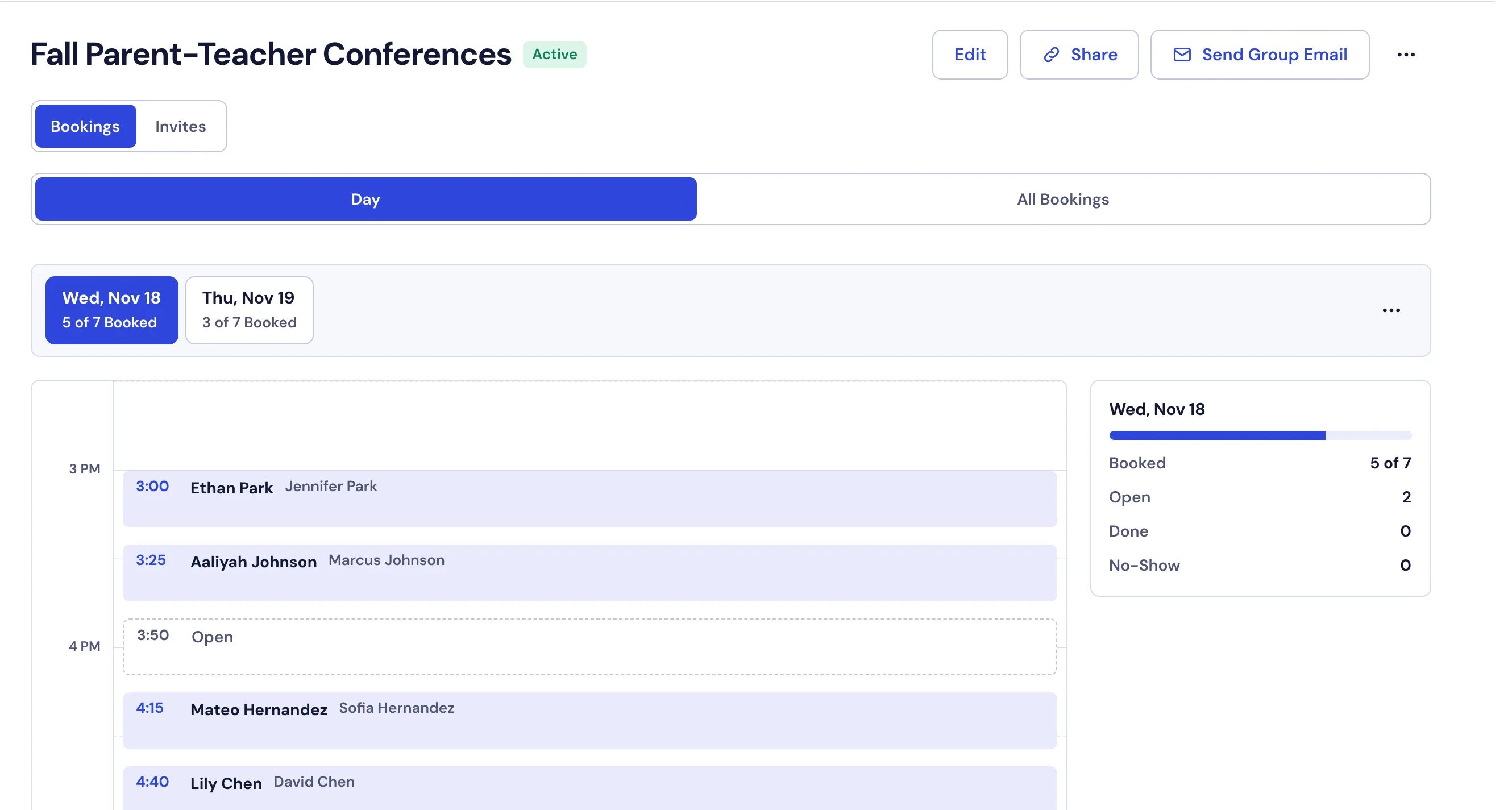
On your side, the conference page lists every booked time with the family's name. Select Print Day Sheet from the ⋯ menu for a paper schedule to keep on your desk, or Export CSV from the same menu to open the list in a spreadsheet. The Parent-Teacher Conferences page shows the whole flow.
Two more settings help with privacy and language. Child Name Format lets you ask for First Name, First Name + Last Initial or Full Name, or leave the child field off with Do Not Request Child Name. On Teacher Pro, parents can switch the booking page to Spanish or French, and their emails come in that language.
Use Both: A Hybrid Approach
You do not have to pick one. An online link plus a paper option for the families who need it covers the whole class.
Put the link on paper. Print a short note for backpacks with the link and a QR code. In SignUpSnap, select Share, then Download QR Code on the QR Code tab.
Hold a few times for paper families. Before you share the link, remove the times you plan to hand out by hand, so the two lists never overlap. In the editor, select a time to remove it, the same way you would skip a lunch break.
Keep the can't-make-it line. Tell families on the note to call, write back or send a message if none of the times work.
Help by phone. If a parent calls, open the link and book the time with them, using their email so they get the confirmation.
For the planning side, How to Schedule Parent-Teacher Conferences Without the Email Chaos walks through days, slot length and follow-up. If you offer more than one way to meet, see Let Parents Choose In Person, Video or Phone.
Which One Should You Use?
Paper suits a small class whose families come into the building. An online sheet suits a bigger class, families who are hard to reach in person, or more than one set of conferences. If your class has a mix, use both.
Whichever you pick, send it home about two weeks before the first conference date.